

Introduction
At some point, the way your organization handles IT stops working as well as it used to.
Maybe your IT person is overwhelmed and always in reactive mode. Maybe you’re calling a break-fix provider after problems happen, waiting for someone to show up, and hoping the fix holds. Maybe you’ve grown, your technology has grown with you, and the informal approach that worked three years ago is starting to crack under the weight of complexity.
This is the moment most businesses start looking at Managed Services and wondering what it actually takes to get there.
The transition from traditional IT support to a Managed Services model is a meaningful operational shift. It’s not just a vendor swap. Understanding what’s involved, and how to prepare makes the difference between a smooth transition and a frustrating one.
What Actually Changes
The most important thing to understand is this: managed services is a model, not just a service.
Traditional IT support, whether that’s a break-fix provider, a part-time contractor, or an internal generalist is typically reactive. Something breaks, you call someone, they fix it. The relationship is transactional. There’s no ongoing accountability for the health of your environment.
A Managed IT Services Provider (MSP) operates differently. The relationship is continuous, structured, and proactive. Your MSP is responsible for monitoring, maintaining, and managing your IT environment on an ongoing basis, not just responding when things go wrong.
Here’s what that shift looks like operationally:
From reactive to proactive – Instead of waiting for problems to surface, your MSP is monitoring systems in the background; identifying risks, applying patches, and addressing issues before they affect your operations.
From informal to documented – Managed services run on process. Your environment gets documented, your assets get inventoried, your configurations get standardized. This creates a baseline that enables faster support, better planning, and reduced single points of failure.
From variable to predictable – One of the most tangible changes is cost structure. Break-fix support produces unpredictable IT bills; big invoices after incidents. Managed services typically operate on a flat monthly fee, which makes budgeting significantly easier.
From generalist to specialized Your MSP brings a team, not just a person. When a specific issue requires a network specialist, a security analyst, or a cloud architect, that expertise is available, without you needing to hire for it.
Tecnet’s Onboarding Process
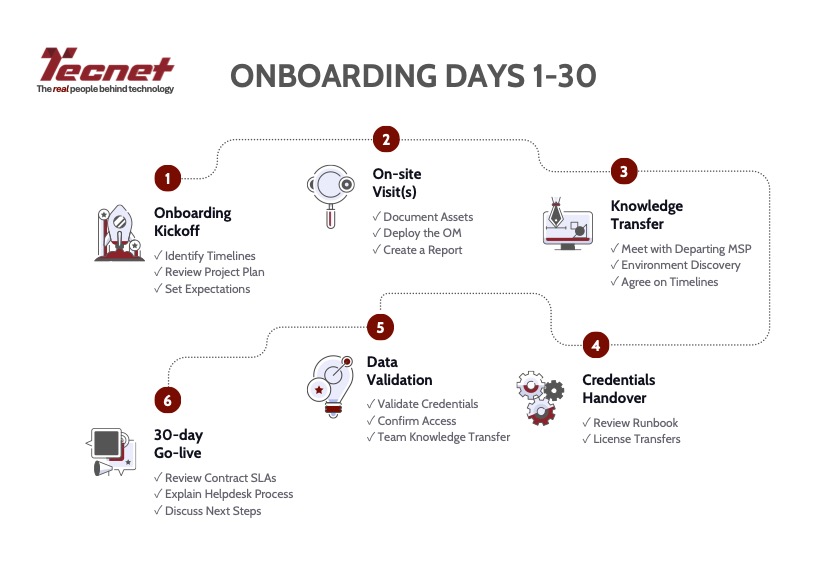
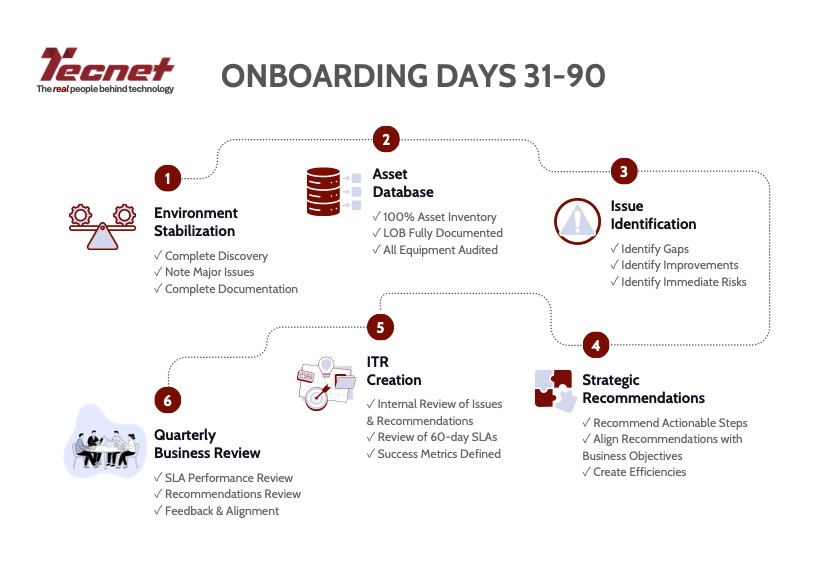
At Tecnet, we follow a structured 90-day onboarding process to ensure every new client is set up for long-term success. The journey is broken into two phases; the first focused on getting you live quickly and smoothly, and the second on deepening our understanding of your environment and aligning on a path forward.
Days 1–30 are all about getting you operational. We begin with an onboarding kickoff to align on timelines and expectations, move through on-site visits, knowledge transfer from your previous provider, credentials handover, and data validation; culminating in a full go-live by day 30.
Days 31–90 shift from setup to stability and strategy. Once you’re live, we turn our attention to fully documenting your environment, building a complete asset database, identifying gaps and risks, and delivering strategic recommendations, all leading to your first Quarterly Business Review where we align on what’s working and where we’re headed together.
What to Expect During the Transition
The onboarding phase is where most of the transition work happens. It takes time, and it should. Rushing it creates gaps. A structured onboarding is what allows your MSP to actually manage your environment effectively from day one.
Here’s what a well-run transition typically involves:
1. Discovery and Assessment
Before anything can be managed, it needs to be understood. Your MSP will conduct a thorough audit of your existing environment including hardware, software, licensing, network infrastructure, security posture, and any documentation that exists. This phase surfaces things many organizations didn’t know they had, like forgotten servers, unlicensed software, outdated configurations, gaps in backup coverage.
Expect this to take time and require access. The more prepared you are to provide that access, the faster and cleaner this phase goes.
2. Documentation and Standardization
Based on the assessment, your MSP will build out the documentation and baseline configurations needed to support your environment. This includes network diagrams, asset inventories, configuration records, and runbooks for common support scenarios.
This is foundational work. It’s what enables your MSP’s team to support your environment consistently, and not just the technician who happened to set it up.
3. Tooling Deployment
Managed services depends on tooling: monitoring agents on endpoints and servers, remote management software, backup agents, security tools. These need to be deployed across your environment during onboarding.
This is typically low-disruption for end users, but it’s worth communicating to your team that new tools are being rolled out and why.
4. Process Alignment
How your team submits support requests will likely change. You’ll move from texting or emailing a single person to using a structured ticketing system. Response times will be defined by a Service Level Agreement (SLA), not by whoever happens to be available.
This takes a short adjustment period for staff, but the result is better accountability, faster resolution, and a clear record of all IT activity.
5. Stabilization Period
Most MSP engagements include a stabilization period, typically 30 to 90 days.. where the team is actively resolving legacy issues identified during onboarding, calibrating monitoring thresholds, and establishing a rhythm with your team. This is normal. The environment improves measurably during this phase.
How to Prepare Your Organization
The businesses that experience the smoothest transitions are the ones that treat this as a business project, not just an IT project. Here’s how to set yourself up for success.
Get your stakeholders aligned early. The decision to move to managed services should involve leadership, operations, and anyone who regularly interacts with IT. Surprises mid-transition create resistance. When people understand why the change is happening and what to expect, adoption is faster.
Gather what documentation you have. Even if it’s incomplete or informal, pull together whatever records exist likes hardware lists, software licenses, network passwords, vendor contacts. Your MSP will build on this or fill the gaps, but starting with something is always faster than starting from nothing.
Audit your vendor relationships. Know who owns your internet service, your phone system, your software subscriptions, your domain registrations. These relationships will either transfer under your MSP’s management or need to be coordinated with them. Having this list ready avoids delays.
Communicate with your team. Let your staff know what’s changing, who to contact for support, and how to submit requests under the new model. A short internal communication explaining the new ticketing process and expected response times goes a long way toward a smooth transition.
Be realistic about timeline. A thorough onboarding takes weeks, not days. The work done during this phase directly determines how well your environment is managed afterward. Prioritize doing it right over doing it fast.
A Note on the Mindset Shift
One thing that catches organizations off guard isn’t operational, it’s moreso relational.
With break-fix support, your expectation is simple: call when something breaks, get it fixed. With managed services, the expectation is a partnership. Your MSP is accountable for the health of your environment, which means they need access, information, and engagement from your side.
This means showing up to quarterly business reviews. It means looping in your MSP when you’re planning a new hire wave, opening a new location, or adopting a new platform. The more your MSP understands your business, the better they can align your IT to support it.
The best managed services relationships are built on proactive communication, not just reactive tickets. That dynamic starts at onboarding; and it’s one of the biggest factors in long-term value.
What now?
Moving to managed services is a meaningful change, but it’s a manageable one. The organizations that approach it with clear expectations, internal alignment, and a willingness to invest in a proper onboarding come out the other side with a more stable, more secure, and better-documented IT environment.
The shift from reactive to proactive isn’t just a service model change, it’s a maturity milestone. And with the right partner, it’s one that delivers measurable results.
Ready to explore what a move to managed services would look like for your organization?
Whether you’re experiencing constant outages, struggling with cybersecurity, or simply trying to modernize your systems, managed IT services provide a foundation designed for long-term stability and growth.
Learn more about our IT Managed Services, or contact us today to book your free IT Consultation